Follow the costs
Keep recorded labour, purchases and allocated receipts with the job. Review the detail against the work you priced.
FOR BUILDERS RUNNING THEIR OWN JOBS
A full diary does not tell you what a job is earning. Bring labour, purchases, extras and billing together so you can understand how the work is performing.
14 days free. Card required. Your chosen paid plan renews automatically after the trial unless you cancel beforehand.
Built for the trade. By the trade.
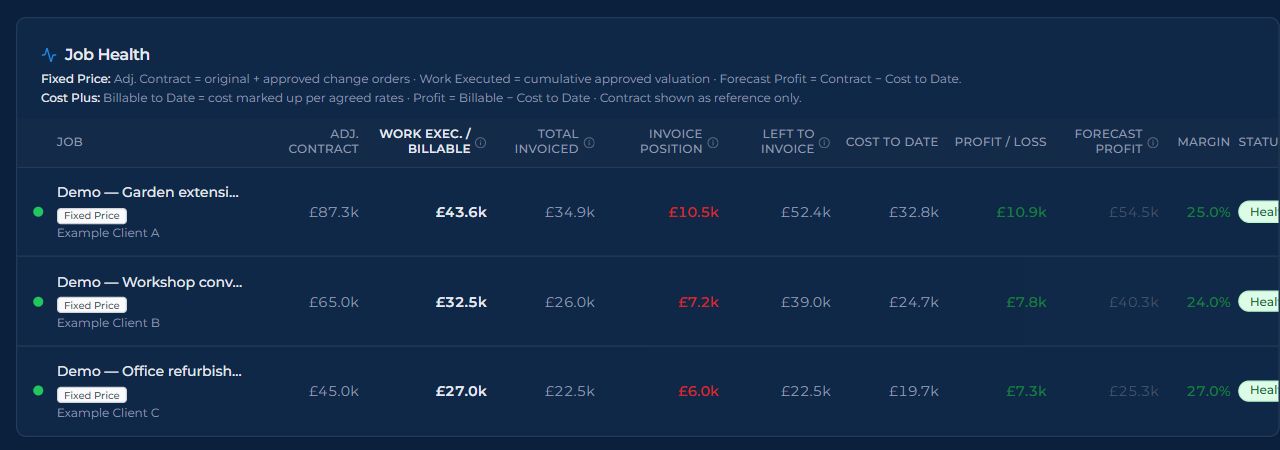
Review recorded costs alongside contract value, work executed and the invoice position. Open the underlying records when a number needs a closer look.
THE WORK BEHIND THE RESULT
Keep recorded labour, purchases and allocated receipts with the job. Review the detail against the work you priced.
Follow reviewed extras and approved change orders into the job’s commercial picture. Pending work is not agreed contract value.
Review profit and loss alongside invoices, outstanding balances and payments. Money invoiced is not the same as money received.
Your profit picture depends on the costs, rates and commercial values recorded, the reporting scope and your job’s fixed-price or cost-plus workflow.
Explore costs and purchases ↗TRY IT WITH WORK YOU KNOW
You do not need to move every job at once. Use a job you understand to see how the workflow fits your business.
Set up a building job you already know and bring in its quote or commercial starting point.
Add the labour, purchases and changes as the job develops. Check approvals and the rates your company uses.
Use job health and financial reports to inspect the figures and the records behind them.
No. Record and review the relevant costs and commercial values, check your company rates and choose the correct reporting scope. Civion helps you inspect those records together; it does not discover missing costs or guarantee that a job will make money.
Create your company, choose a plan and complete card setup to activate the 14-day trial. Tutorials and email support are available. Trial AI funding is limited to £10 per company across the 14 days.
Review the current monthly and annual plans and any eligible new-company offer before subscribing. Prices are per company, excluding applicable VAT. Your chosen plan renews automatically after the trial unless you cancel beforehand.
See current plans and offer terms ↗Use the tutorials and email support during the trial. A personal onboarding session is included after your first successful subscription payment, subject to your plan’s session allowance.
Explore the tutorials ↗YOUR NEXT BUILDING JOB
Explore the workflow before committing the rest of your business.
Start your 14-day trial14 days free. Card required. Your chosen paid plan renews automatically after the trial unless you cancel beforehand.
Review the plans and current offer ↗